
Segmentation
Segment customers entering the Cancel Flow and route them to different deflections + offers based on who they are.
Different customers get different flows
A member paying for perks and a subscriber on a monthly refill cancel for different reasons, and a save attempt written for one misfires on the other. Segmentation routes each customer type into its own cancel flow, so the reasons they see and the offers they get match who they are. Customers who don't match a segment go through your default cancel flow.
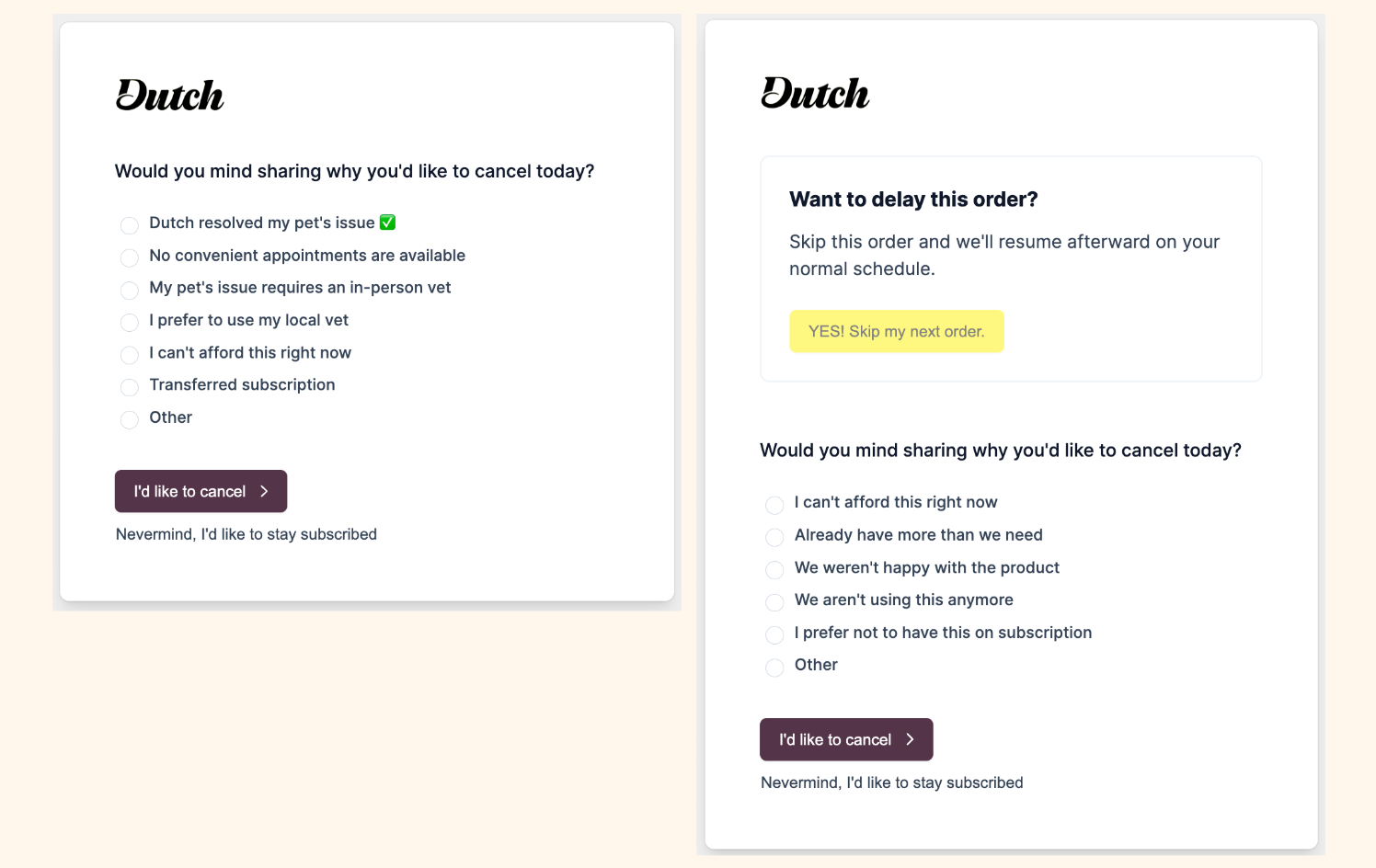
Common ways to split a flow
Most segments follow a difference in the business model or in the relationship with the customer.
- Product or plan, such as memberships versus product subscriptions, or one flagship product versus everything else.
- Billing interval, such as 1-month versus 3-month orders.
- A customer tag, such as a VIP tag that earns a more generous offer.
- Location, such as a flow with the one-click cancel option for subscribers in states with stricter cancellation rules, or a dedicated flow in the local language for a key market.
Each segment gets a complete flow
Each segment runs its own cancel page, cancel reasons, deflections, and offers, so you can shape every step around that customer type.
Skipping an order is a good option for a product subscriber and means nothing to a membership. Some cancel reasons only apply to one type of customer. And high-value customers can see elevated offers, like premium support or perks, that you wouldn't extend to a first-month subscriber. Cancel Reasons, Deflections, and Targeted Offers cover building each piece.
Our team builds segments with you
You tell us which customers behave differently, and we build the targeting. Each new flow shows up in your Cancel Flow Editor for review, and it goes live when you're ready.
To confirm a split works, start a cancellation from a test customer in your customer portal and check that it opens the right flow.
The right number of segments depends on your volume. Every split divides your traffic, so a small segment takes longer to show which offer performs best. The splits worth making are where customers leave for different reasons, not every product variation. Analytics & Insights shows how different customer types respond over time.
Dunning campaigns segment the same way
Segmentation also applies to failed payment recovery. Dunning campaigns can be split too, for example by plan or product, each with its own messaging, and you can A/B test variants against each other.
A customer is in one campaign at a time, one per customer rather than one per subscription, so a second failing subscription doesn't start a second campaign. And a failed payment that matches none of your segmented campaigns falls through to your Default campaign.
If a campaign targets a product name or invoice description, renaming the product can send those customers to Default. When you launch or rename a product or plan, let us know so we can check the targeting. A targeting change applies to new failures, so customers already partway through a campaign finish the one they're in unless we stop those campaigns and let their next failed payment start the right one.
Where to go next
Each part of a segmented flow has its own page.
- Cancel Flows Overview, how the pieces of a flow fit together.
- Getting Started, what setup looks like and how flows go live.
- Cancel Reasons, writing reasons that fit each customer type.
- Deflections, the value reminders and easy ways to put off cancelling.
- Targeted Offers, matching offers to the reasons customers give.
- Custom Branding, making every flow look like your brand.
- Analytics & Insights, measuring saves and offers across customer types.