
Churn Buster
Passive Churn Active Churn Results
Sign In See Pricing
Churn Buster
Passive Churn Active Churn Results Sign In See Pricing
Braintree / Recommended Braintree Settings
Dunning
Adaptive Campaigns Emails SMS Nudge Last Chance Offers Retries Card Updates Alerts Data & Testing
Cancel Flows
Overview Getting Started Testing Deflections Cancel Reasons Targeted Offers Custom Branding Segmentation Analytics & Insights
Integrations
Recharge Stripe Braintree
Braintree Subscriptions + Churn Buster Recommended Braintree Settings
API Other FAQ
Dunning
Adaptive Campaigns Emails SMS Nudge Last Chance Offers Retries Card Updates Alerts Data & Testing
Cancel Flows
Overview Getting Started Testing Deflections Cancel Reasons Targeted Offers Custom Branding Segmentation Analytics & Insights
Integrations
Recharge Stripe Braintree
Braintree Subscriptions + Churn Buster Recommended Braintree Settings
API Other FAQ
Docs  /  Braintree

Recommended Braintree Settings

The exact Braintree control panel settings we recommend so retries, dunning emails, and cancellations don't double up.

While Churn Buster can add additional retries to your failed payment recovery campaigns, it's important to set Braintree retry settings so they work optimally with Churn Buster.

No matter what, it's critical to enable automatic retries and set the final option to "Leave the subscription past due." (even if you'd like to cancel unpaid subscriptions when campaigns end)

This allows Churn Buster to run longer campaigns, since the customer won't get canceled by Braintree while still being emailed for a missed payment.

Canceling Subscriptions

If you would like to cancel subscriptions while using Churn Buster, you can choose this option during account setup (or let us know to enable this feature for your account). This will automatically cancel subscriptions when a campaign to recover a missed payment isn't successful.

Recommended Braintree Retry Settings

It's important to have a predictable retry schedule in-place, that will position a couple retries before Churn Buster sends the first email in your campaign. This often can recover soft-failures without emailing anyone. Our recommended settings are 1 day, 3 days, then finally "Leave the subscription past due."

To edit your settings in Braintree:

  1. Click the Settings tab, then click Processing, scroll down to Recurring Billing, and click Options
  2. If it's not already checked, click on "Automatically retry failed transactions"
  3. Set the options to 1 Day, 3 Days, and then "Leave the subscription past due" as the final setting
  4. Click "Save Recurring Billing Options"
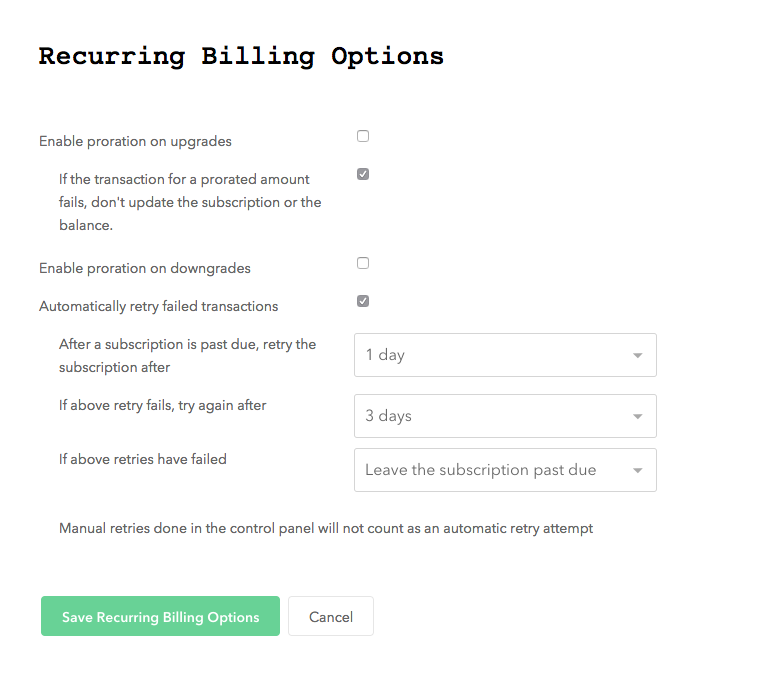
Braintree control panel Recurring Billing Options screen showing automatic retry settings configured to 1 Day, 3 Days, and Leave the subscription past due

Integrates easily with all subscription platforms, or via API

  • Checkout Champ
  • Stripe
  • Shopify
  • Awtomic
  • Skio
  • Stay Ai
  • Recharge
  • Seal Subscriptions
  • OrderGroove
  • Subbly
  • Smartrr
  • Prive
  • Loop
Churn Buster

Established in 2013
Based in San Diego, CA

Questions?
Email support@churnbuster.io

Products
Dunning Cancel Flows Results Pricing Sign In
Compare
Churnkey alternative Butter Payments alternative Chargebee Retention alternative Baremetrics Recover alternative Flycode alternative
Learn
Learn Passive Churn Failure Reasons Recovery Campaigns Recovery Rate Resources
Company
About Partners Security & Compliance Privacy Policy Terms of Service

© Churn Buster, LLC · All Rights Reserved