
Deflections
Educational content, pause options, and skip-an-order — the deflection types Churn Buster supports and when to use each.
Deflections are the first thing a cancelling customer sees
When a customer clicks cancel, the first screen of the flow shows up to two deflections, options that let them fix the problem without leaving. They appear before the exit survey asks why, so everyone in that flow sees them.
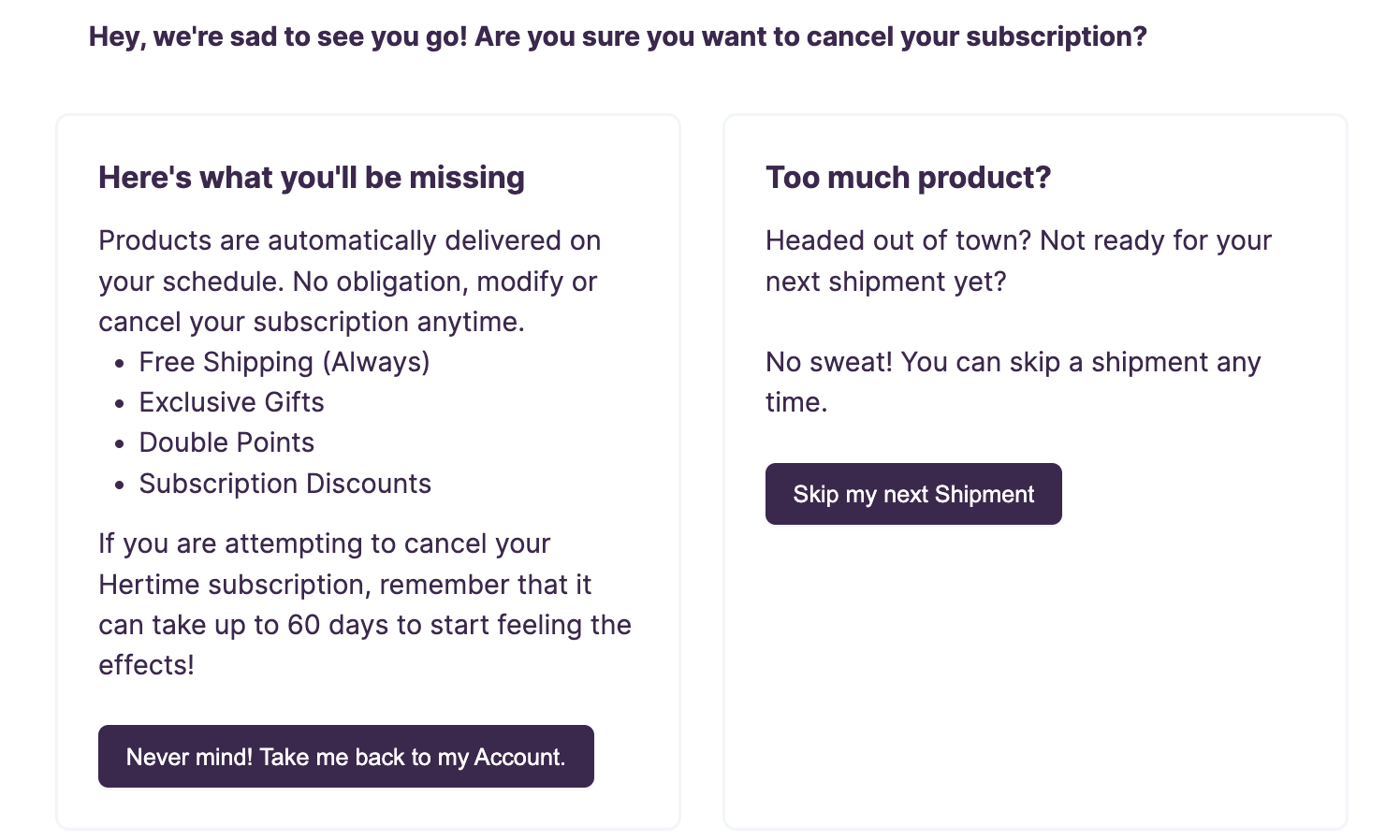
If you turn on the one-click cancel option, its link sits on this same screen and your deflections still display.
Deflections work best when they fit almost everyone
The best practice is usually to pair two kinds of deflection.
- A reminder of what they'll miss, like a benefits list, a note on your mission, or a video from the founder.
- An easy way to put off the decision, like talking to your support team, or skipping or pausing the subscription where your platform supports it.
Keep discounts out of your deflections. In a deflection, a discount reaches everyone, including customers who aren't price sensitive and customers who weren't set on cancelling but will gladly take it. A discount does its best work as a targeted offer for customers who say price is the reason.
You edit each deflection's message in the Cancel Flow Editor, and you can add an image or video to it. If you run separate flows for different customer types, each flow carries its own deflections. Segmentation covers that setup.
Targeted offers answer the reason a customer gives
Targeted offers come on the next screen, after the customer tells you why they're considering cancelling. That's where you deliver the right offer at the right time. Each cancel reason can carry its own offer.
Smart Offers is on by default. When you add several variations of a targeted offer, the flow keeps improving, serving the top performing offers more often over time. Targeted Offers covers setting them up.
What happens when a customer accepts
On a supported platform, Churn Buster applies a skip or pause to the subscription for you, and the customer stays subscribed. We confirm what your platform supports during onboarding.
To get an email when a customer accepts an offer, turn on the Cancel Session Won checkbox in Account Settings for each teammate who should hear about it. After accepting, the customer sees Churn Buster's confirmation screen, or you can send them to a page of your own by adding a Confirmation URL to the offer in the offer editor.
A customer who takes a deflection, then comes back and cancels a few hours later, counts as a loss, not a save. Every session one subscription has within 24 hours collapses into a single result, and a cancellation anywhere in that window decides it. Analytics & Insights covers how Churn Buster calculates save rate.
Where to go next
Deflections are one piece of the flow, and the pages below cover the rest.
- Cancel Reasons, designing the survey that follows your deflections.
- Targeted Offers, matching offers to the reasons customers give.
- Custom Branding, styling the flow so it looks like your brand.
- Segmentation, running different flows for different customer types.
- Analytics & Insights, measuring saves and offer performance over time.