New features and integrations for Dunning and Cancel Flows, newest first.
2026 Updates
19 updates
DunningCancel Flows
Ask about retention with the Churn Buster MCP
Connect your AI app to Dunning and Cancel Flows data with Churn Buster's measurement guidance. The MCP is now available to every account at no extra cost, including the free Measure plan. The account owner can turn it on under Settings → Integrations → MCP.
With MCP
Example conversation
Recovery fell from 44% to 27% in September. Should we change our retry schedule?
Checked complete months, recovery sources, and your retry changes.
No change needed yet. Recovery is steady. September isn't finished, so its 27% isn't a final result.
What the data shows
Check
Result
Complete months, Apr–Aug
41–46% recovery
September campaigns still open
About 610
Recoveries from retries
About 60%
Retry schedule changed
Aug 12
Give the new schedule 60+ days of complete cohorts, then compare it to the summer. Your team can review that comparison with Churn Buster.
B2B accounts often have several people who can fix a failed payment: finance, ops, and the account owner. Send them all in backup_contacts on the Customer Endpoint, and Churn Buster CCs them from the 4th campaign email on. Each request replaces the whole list.
Connect Claude, ChatGPT, or another app that supports remote MCP servers with read-only access, then ask for breakdowns the dashboard doesn't show. Available to every account, including the free Measure plan. The account owner turns it on under Settings → Integrations → MCP.
Skip the confirmation screen when customers cancel
You can skip the confirmation screen and send customers who cancel straight to your Cancellation Exit URL. It helps when that page shows what they need, like remaining installments. Turn it on with the checkbox next to the exit URL in the Cancel Flow editor.
Offer one-click cancellation for click-to-cancel rules
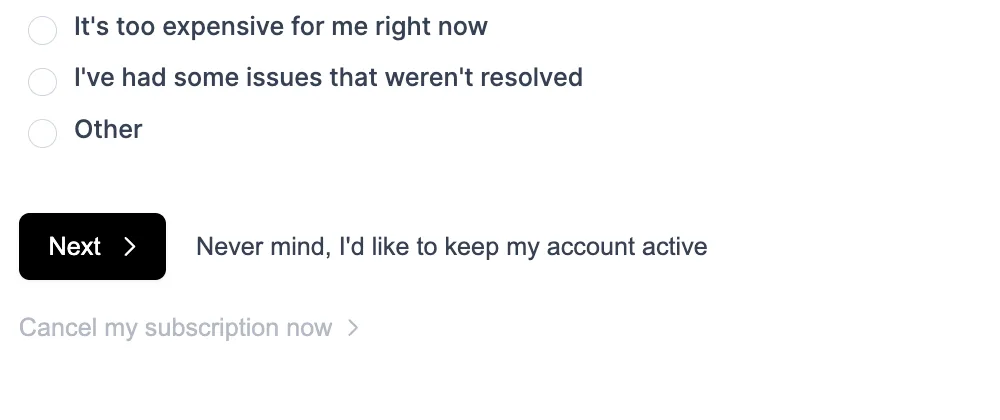
You can add a "Cancel my subscription now" link to step 1 of your cancel flow, for every customer or only those in states you list. Your save offers still show. Turn it on with the Click-to-cancel (one-click) option in the Cancel Flow editor settings.
Offer Cooldown limits how often one customer can accept the same offer, like once every 3 months. Until the interval passes, their flow skips that offer and still shows your others. Set it under Repeat acceptances in the Offer editor.
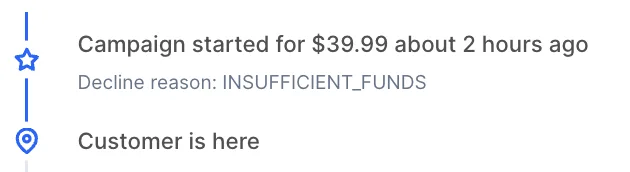
The campaign timeline shows the decline reason when your billing platform sends one. Support can tell a customer whether the card expired, ran short on funds, or the bank declined it. Automatic, no setup.
DunningImproved·
Recover Stripe customers who pay by bank account
Stripe customers can add a bank account (ACH) on your card update page, so customers who pay by bank recover on the same page as card customers. Ask the Churn Buster team to turn it on.
Ordergroove merchants can route cancellations from the Ordergroove subscription manager into Churn Buster Cancel Flows. You collect reasons, test custom and presentation offers, and see results in Cancel Flow analytics.
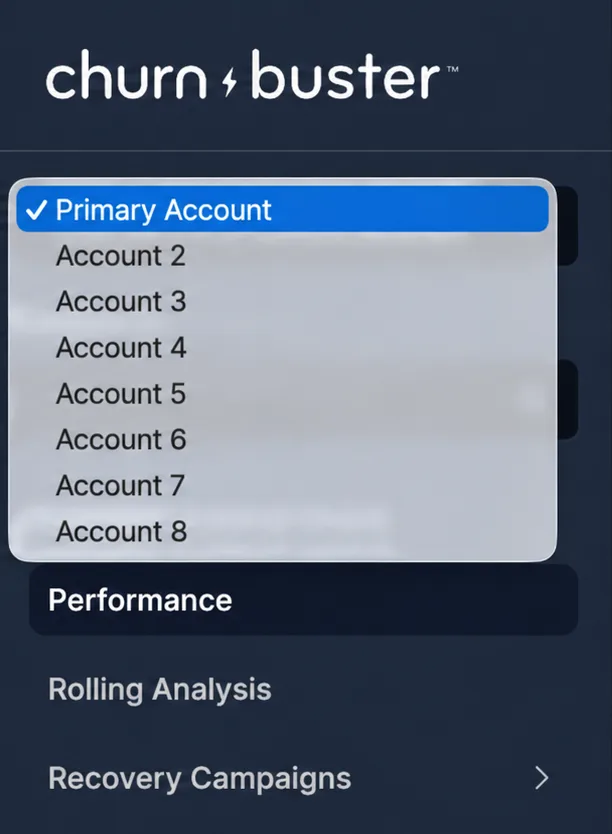
Agencies and teams running several brands can switch between Churn Buster accounts with one login. Use the dropdown at the top of the left sidebar once you belong to 2 or more launched accounts.
You pick which events send Slack alerts, including cancel flow events, so each channel gets only the alerts people act on. Choose events with the checkboxes for each channel under Settings → Integrations → Slack → Configure.
You can archive offers that no flow uses, then restore them when you need them again. Open the Offer Library in the Cancel Flow editor to archive or restore an offer.
Dunning
Send high value customers their own dunning schedule
You can route customers to different dunning schedules based on customer data, like a longer, more personal schedule for high value customers.
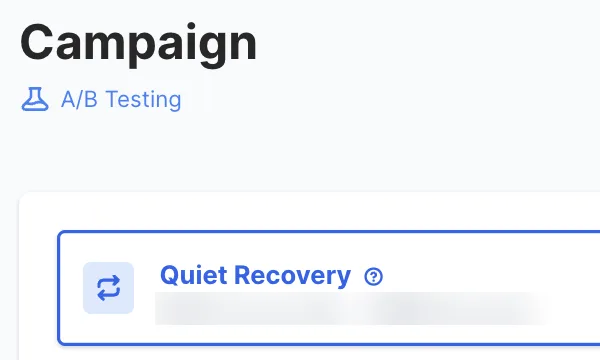
An indicator appears only while a dunning schedule has an active A/B test, with charts in Rolling Analysis to follow it. You can hold off on schedule changes that would skew the results. No action needed.
Cancel Flows
Remind Inveterate members about their credits
Inveterate brands can offer account credits in a cancel flow, or show members their credit balance and how to use it.
Customers who finish cancelling can go to a Cancellation Exit URL, separate from your general exit URL, like a confirmation page, survey, or post-cancel offer. Set it in the Cancel Flow editor.
For Stripe accounts, Churn Buster can mark an invoice uncollectible when a campaign ends without recovering payment, so bad debt reporting in Stripe matches your write-offs. Ask the Churn Buster team to turn it on.
Dashboard logins use session-based authentication, which makes access to your Churn Buster account safer.
2025 Updates
21 updates
Dunning
Get customer text replies in your inbox
Customer replies to your SMS dunning messages forward to an email address you choose, so support can answer payment questions. Add the address under Settings → Integrations → SMS Nudge.
New accounts start with a default dunning schedule and payment emails, so recovery can run on day one. Turning on Cancel Flows adds a default flow with starter offers. Live for new accounts, no action needed.
Dunning and cancel flow events stream into Snowflake, BigQuery, Redshift, or another warehouse through webhooks. Data teams can report on recoveries and saves next to the rest of their customer data.
A beaker icon appears in Offer Analytics, the Flow Editor, and the Offer Editor only while an offer has more than one active variant. No action needed.
Cancel FlowsNew integration·
Cancel Flows now work with Seal
Seal merchants can route cancellations into Churn Buster Cancel Flows, collect a reason for every cancellation, and test what keeps customers.
Offer Analytics can group results by individual offer, so you see how each one performs even when it runs across several reasons. Live for all Cancel Flows accounts, no action needed.
DunningNew integration·
Recover failed Rivo payments
Rivo merchants can add Churn Buster recovery campaigns without changing subscription platforms.
Every webhook includes a signature, so developers can verify requests came from Churn Buster. Signing is on for every account. Find your keys under Settings → Integrations → Webhooks → Webhook security.
From the 4th campaign email on, Churn Buster CCs the backup email addresses on a customer's profile. A spouse, bookkeeper, or teammate can step in and update payment.
Churn Buster campaigns run on failed Loop payments around Loop's retry timing, with customer portal links for updating payment. Your retry setup stays as is.
A customer’s cancel sessions show in their customer history, so support knows why someone tried to cancel before replying. Live for all accounts, no action needed.
Cancel Flows
Remind customers what they're paying for
A presentation offer shares information, like a benefits reminder, with no accept button.
Deflection offers report results next to your other offers. Live for all Cancel Flows accounts, no action needed.
PlatformSecurity·
Delete a customer's data yourself
You can delete customer data under Settings → Data Deletion. You can’t undo deletion, which removes data from Churn Buster only, not your billing platform.
Churn Buster connects to Prive to recover failed payments with campaigns and retries, and Churn Buster manages the webhooks for you. Prive merchants can add recovery without a developer.
Cancel FlowsImproved·
Faster sentiment analysis on large feedback volumes
Sentiment analysis loads and filters faster. Retention teams can work through large volumes of cancellation feedback in one sitting.
PlatformNew integration·
Install Churn Buster from the Stripe App Marketplace
Churn Buster installs from the Stripe App Marketplace. Stripe businesses can find and set up Churn Buster where they already manage billing.
Rolling Analysis tracks started campaigns, card updates, successful retries, cancellations, and passive churn day by day and over rolling 15, 30, and 45+ day windows. You can tell a trend in recovery from a normal swing.
DunningCancel FlowsSecurity·
Use more than one Recharge access token
Recharge merchants can add alternate access tokens alongside the primary token. Churn Buster spreads requests across those tokens to raise the Recharge rate limit.
Churn Buster dunning campaigns and Cancel Flows work with Awtomic, including customer portal links for updating payment. Awtomic brands handle failed payments and cancellations in one tool.
Offer changes show as you make them. You see how an offer will look to customers without publishing it to check.
Dunning
Route each failed payment by why it failed
Adaptive Campaigns route each failed payment by decline type. Soft declines get earlier retries and hard declines go to a new card request, so retries go to cards that can succeed.
You can export preset ranges of 30, 60, or 90 days, or choose All Time for your full history. The daily performance export is under Rolling Analysis → Export.
DunningCancel FlowsImproved·
Set up Inveterate faster and track more events
Churn Buster registers Inveterate webhooks automatically and tracks more events. Inveterate brands spend less time on setup, and campaigns respond to more of what happens in Inveterate.
Cancel Flows
Get more accurate cancellation reasons
Churn Buster can randomize the order of cancellation reasons. Customers pick the reason that fits instead of the first one listed, so your reason data is more accurate.
Cancel Flows works with Stripe. SaaS and membership businesses billing on Stripe can collect reasons and show offers before a customer cancels. The option to cancel at the end of the billing period followed in May 2024.
An analytics page shows how each offer performs. You can keep the offers that save customers and drop the ones that don’t. A by-reason view and a date picker followed in spring 2024.
2023 Updates
14 updates
Cancel Flows
Make cancel flows match your brand
Cancel flows take your brand colors, fonts, button styles, and logo. The flow looks like part of your site, so customers trust it while they decide whether to stay. Set it in the Style Editor.
Churn Buster connects to Inveterate to recover failed membership payments with campaigns and billing retries. Membership brands can keep members who would otherwise lapse over a failed card.
A fallback offer gives customers a way to stay only when they skip choosing a cancellation reason.
Cancel Flows
Use Cancel Flows on any subscription platform
Cancel Flows works on any subscription platform, with customers finishing at your exit URL. Brands on a platform without a direct integration can still collect reasons and show offers before a customer cancels.
Cancel FlowsImproved·
Preview a cancel flow before it goes live
The cancel flow preview shows what customers will see before the flow goes live. You catch a broken offer or confusing step before it costs you a save.
Cancel Flows
Sync saves and cancellations to your other tools
A webhook event fires when a customer accepts an offer or cancels in your cancel flow. Developers can sync saves and cancellations to a CRM, email tool, or data warehouse as they happen.
Sentiment AI scores cancellation feedback as positive, negative, or neutral and surfaces patterns across your reasons. Retention teams see which groups of customers need attention without reading every response.
Cancel Flows
See which problems cost you the most subscribers
A chart ranks why customers cancel. Product and retention teams see which problems cost the most subscribers and where to aim offers.
PlatformImproved·
Get Cancel Flows results in your weekly digest
Sent on Grow, Optimize, and older plans. The redesigned weekly digest includes Cancel Flows results alongside your recovery results.
PlatformImproved·
Check results from your phone
Dunning and Cancel Flows get their own sections, and the dashboard works on mobile. You find each product’s settings faster and can check results from your phone.
Cancel Flows
Test more than one offer per cancellation reason
Each cancellation reason can test more than one offer. You learn which offer saves more customers for each reason instead of guessing.
A save rate chart tracks your cancel flow over time, and a list shows every cancel session. You can see whether a flow change saved more customers, then open any single session.
Cancel Flows
Turn a cancel flow on or off without code
You can set any single cancel flow to Active or Inactive yourself. The Churn Buster team handles turning Cancel Flows on or off for your whole site.
2022 Updates
14 updates
Cancel Flows
Offer Recharge customers a discount or product swap
Recharge merchants can offer a discount or a product swap in their cancel flow. Customers leaving over price or product get a reason to stay. Skip + Discount followed in September 2023.
Customer segments can each get a different cancel flow, and you can duplicate a flow. For brands with more than one kind of subscriber, each group sees the offers that fit them.
Custom columns in cancel session exports help you prepare data for your spreadsheet or BI tool. Ask the Churn Buster team to add them.
Cancel Flows
Add images, GIFs, and video to offers
Offers can include images, GIFs, and videos. A product photo or short video shows customers what they’d give up better than text alone.
DunningImproved·
Branded card update pages for Recharge
Recharge merchants can send customers to a Churn Buster card update page. Customers update payment on a page that matches your brand. It became the default for Recharge schedules in December 2022.
An email or Slack alert fires when a customer goes through your cancel flow. Your team can follow up with a customer who cancelled while the reason is fresh.
Churn Buster dunning campaigns run on failed Smartrr payments, around Smartrr’s retry timing. Smartrr merchants add recovery emails and measurement without changing their retry setup.
Churn Buster dunning campaigns run on failed Stay AI payments, with retries and optional cancellation through the Stay AI API. Stay AI merchants get campaigns that start and stop with what happens in Stay AI.
The Bold Subscriptions integration launched in 2022 to recover failed payments through dunning campaigns. You can no longer select it during onboarding or on the Integrations page.
Dunning
Catch big accounts before their campaigns end
An alert tells your team about big ticket customers before their campaign ends. Someone can reach out personally while there’s still time to keep the account.
Cancel Flows launches as Churn Buster’s second product, starting with Recharge merchants. Customers who start to cancel see a short flow that asks why they’re leaving and offers ways to stay. Churn goes from a number to a list of reasons you can act on.
Segments built from customer property filters get their own recovery results. You can see which customer groups recover best and where a different schedule could help.
Dunning
Show leadership what changed with Churn Buster
Performance Comparisons on Rolling Analysis compare recovery results from before and after you started with Churn Buster. Ask the Churn Buster team to set one up.
Dunning
A/B test your dunning schedule
Schedule Experiments split customers between campaign schedules and compare recovery. You find out which timing and messaging recovers more instead of guessing.
A cumulative chart tracks your recovery rate over time. Short term swings flatten out, so you can see whether recovery is improving.
Dunning
Personalize emails and schedules with any customer property
Any customer property can personalize emails and route customers to different schedules. Different kinds of customers can each get a message and schedule that fit them.
One recovery path for customers with several subscriptions
Campaigns handle customers with more than one subscription on Braintree and Recharge. Those customers get one recovery path instead of competing emails. API support followed in February 2022.
Dunning
Keep payment emails away from test accounts
Campaign emails skip addresses at domains you choose. Useful for keeping payment emails away from test accounts, internal staff, or partner domains.
One page shows a customer’s campaigns and details. Support can answer a billing question without clicking through separate records.
DunningImproved·
Customers update payment without a Recharge password reset
Card update links for Recharge customers log them in to the Recharge portal automatically. Customers skip the password reset and go straight to updating payment.
2020 Updates
8 updates
DunningImproved·
See every email, text, and retry together
Every email, SMS, and retry for a campaign shows in one timeline. Support can see everything a customer has received at a glance.
PlatformImproved·
Keep working while exports run
Exports run in the background, and every export includes more fields. You can keep working while an export builds.
SMS messages in your dunning campaigns go out during the customer’s local daytime, and Churn Buster handles opt-outs for you. Customers who miss your emails get a text.
You can filter and sort your active campaigns. Your team can find the campaigns that need attention first.
Dunning
See a change's effect the same day
A daily chart tracks recovery performance. You can see the effect of a schedule change or a billing issue on the day it happens.
PlatformSecurity·
Protect your login with two-factor authentication
Two-factor authentication protects your Churn Buster login. A stolen password alone isn’t enough to get into your Churn Buster account.
Dunning
Custom text on your card update page
Ask the Churn Buster team to change the text on your card update page to explain the charge, name the product, or answer questions customers usually ask support.
Stats for each email and step in your schedule show which ones drive recoveries. You can cut or rewrite the steps that recover little.
DunningSecurity·
Collect Stripe cards that need 3D Secure
Card updates for Stripe accounts support 3D Secure for Strong Customer Authentication (SCA). Merchants with European customers can collect cards that require bank authentication.
Dunning
Track card update and retry recoveries over time
Charts show how much revenue card updates and payment retries recover over time. You can see whether a schedule change moved recoveries, and which lever it moved.
Dunning
Payment emails customers recognize as yours
Campaign emails use a template that matches your brand. Customers recognize your payment emails as real, not a phishing attempt.
Campaign started, recovered, and lost events go to your other systems through webhooks or Zapier. Developers and ops teams can update a CRM, trigger a support task, or log recoveries without manual exports.
Payment retries run as steps in Recharge dunning schedules. Recharge merchants recover payments that go through on a later attempt, without the customer doing anything.
Dunning
A custom thank you message after card updates
Ask the Churn Buster team to change the message customers see after they update their payment method. You can thank them in your voice and explain what happens next.
Each email in your schedule shows delivery stats and open rates. You can spot the email customers ignore and rewrite it, or catch a delivery problem early.
Platform
Get your recovery results by email every week
Sent on Grow, Optimize, and older plans. You get recovery results by email each week without logging in.
2018 Updates
18 updates
Dunning
Give each Stripe plan its own dunning schedule
Each Stripe plan can have its own dunning schedule. Annual or high-value plans can get a longer, more personal schedule than a cheaper monthly plan.
Have dunning paused during a migration or pricing change
Pausing a dunning schedule stops new campaigns, which can help during a billing migration or pricing change. Ask the Churn Buster team to pause it.
Dunning
Spot campaigns with bounced emails
Churn Buster flags campaigns with bounced emails as at-risk. You can use the at-risk filter to find customers whose payment emails aren’t reaching them.
PlatformNew integration·
Get campaign updates in Slack, and bounce alerts
Campaign updates post to Slack, Zapier connects Churn Buster to other tools, and you get an alert when a campaign email bounces. You can follow up with that customer another way.
Campaign emails send from your domain, with DKIM and Return-Path records. Payment emails come from an address customers recognize, and authenticated mail is more likely to reach the inbox.
Get a fixed dunning schedule tailored to your needs
If you need to run a fixed schedule, the Churn Buster team can tailor when each email and retry goes out.
Platform
Export campaign data to CSV
Campaign data exports to CSV. Finance and analytics teams can reconcile recoveries and dig into results in a spreadsheet.
DunningNew integration·
Recover failed Recharge payments
Churn Buster dunning campaigns run on failed Recharge subscription payments. Recharge merchants get multistep recovery campaigns without changing subscription platforms.
Customers can update a card or a bank account (ACH) on your card update page. Businesses that bill by bank account can recover those customers through the same campaign as card customers.
Retry failed payments inside your dunning schedule
Payment retries run as steps in your dunning schedule, alongside your emails. A successful retry ends the campaign, so the customer stops getting payment emails. Braintree support followed in December 2018.
Dunning
Split recovered revenue by card updates and retries
Churn Buster splits recovered revenue between card updates and payment retries. You can see which one does more of the work and where to focus when you tune your campaign.
Dunning
Let customers update payment inside your app
A card update popup runs inside your app. SaaS and app businesses can ask logged-in customers to fix a failed payment, with no email click needed.
Cancel subscriptions automatically when recovery fails
Churn Buster can cancel the subscription when a campaign ends without recovering payment. Past due subscriptions stop piling up in your billing system, so your active subscriber count reflects customers who pay.
With Collections on Stripe, a successful payment prompts Churn Buster to retry the customer’s other past due invoices, up to a set number. Customers whose campaign runs past a billing cycle can catch up on older invoices, not only the latest one.
Customers update their card on a branded, mobile friendly page. A page that looks like yours gives customers a reason to trust it before they enter card details.
Every campaign email is editable, with merge tags for customer details and snippets for text you reuse across emails. Your payment emails sound like your company.
Stop payment emails when a customer cancels elsewhere
An API call stops a customer’s campaign when they cancel in another tool. Customers who already chose to leave don’t get emails asking them to update a card.
Some say the team was building Churn Buster by hand, one line of code at a time. Many of the best practices we set back then still run today, as industry standards, 50+ million failed payments later.
Book a tour and we'll share what we've learned along the way.