
Cancel Reasons
How cancel reasons drive offer targeting, and how to design a reason picker that gives you actionable signal.
"No reason" is what a weak survey collects
Every Cancel Flow asks customers why they're cancelling before they go. The answer decides which offer they see and what your reporting can tell you later.
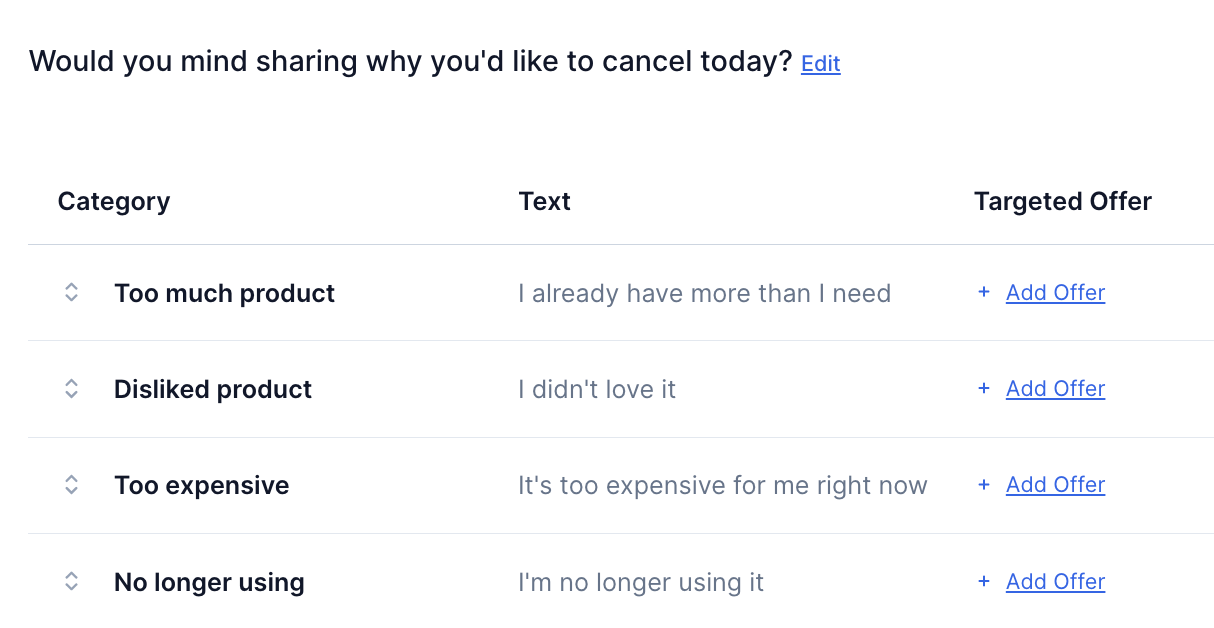
When the reasons are vague or don't match what customers experience, "no reason" piles up, often more than half of all responses, and the survey tells you very little. Reasons written in your customers' terms turn a cancellation into a signal you can act on.
Start from the reasons customers already give
You write the reason list in the Cancel Flow Editor. If you already survey customers when they cancel, match those reasons as closely as you can. If you don't, start with the most common reasons customers have given you. During setup, we build the first version from the reasons in your current cancel flow.
A strong reason list shares a few traits.
- Five to seven options, enough to cover why customers leave and few enough to scan.
- One distinct cause per reason, so two options never split the same answer.
- Plain wording that fits your product, like "my child outgrew this stage" for a children's subscription.
Random order keeps the first reason from winning by default
Customers tend to pick whichever reason sits at the top of the list. You can turn on random ordering for each flow in the Cancel Flow Editor to shuffle the reasons for each customer and collect more accurate cancellation reasons. The option is off by default, and "Other" stays last.
Categories keep your reporting steady as reasons change
Each reason sits under a category, a short heading used to segment your analytics. Because reporting follows the category, you can reword what customers see without breaking your history, and you can group several similar reasons to track them together. When you add or reword a reason, check that it maps to a category in your dashboard.
Short surveys get better answers
The survey asks for a reason and, before the customer cancels, an optional comment. It doesn't branch into chains of follow-up questions, and the survey stays short by design. The comment is where the richest detail shows up, because customers who write in do it by choice and in their own words.
Picking a reason is optional too. Customers who skip it show up under "No reason chosen," which you can treat like any other reason by attaching an offer to it and watching how it moves. If "No reason chosen" or "Other" sits at the top of your results, the list isn't matching what customers experience yet. You can add, remove, or reword reasons until the top answers are ones you can act on.
Each reason can carry its own offer
Once a customer picks a reason, you can show a targeted offer that fits it, like a discount for "too expensive" or a skip for "too much product." Add two offers to the same reason and each customer still sees only one, which starts a test. Smart Offers then routes traffic toward the offer that performs better. Targeted Offers covers how to build them.
Reasons feed your reporting and your win-back emails
In Analytics & Insights, you can see how customers answer and which offers they accept for each reason category. Sentiment AI, the reporting layer inside Cancel Flows, scores the comments and surfaces patterns across them, so you can spot which groups of customers need attention.
Cancel Flows focuses on the moment of cancellation, and follow-up after someone leaves runs in your email platform. The cancel session lost event, available through webhooks and Zapier, carries the reason the customer chose. That makes win-back flows possible, like writing to everyone who named a problem once you've fixed it.
Where to go next
The reason list connects to every other part of a flow.
- Cancel Flows Overview, how exit surveys and deflections fit together.
- Getting Started, what setup looks like and how flows go live.
- Deflections, the value reminders and easy ways to put off cancelling.
- Targeted Offers, matching offers to the reasons customers give.
- Segmentation, running different flows for different customer types.
- Analytics & Insights, measuring saves, offers, and sentiment over time.