
Analytics & Insights
Read your Cancel Flow analytics — save rate, deflection performance, offer acceptance — and what to do with the signal.
Cancel Flows reporting starts on the Performance page
The Performance page is the summary view. It charts saves and save rate over time next to your all-time totals, and it shows the spread of cancel reasons, so you can see why customers leave alongside how many you keep.
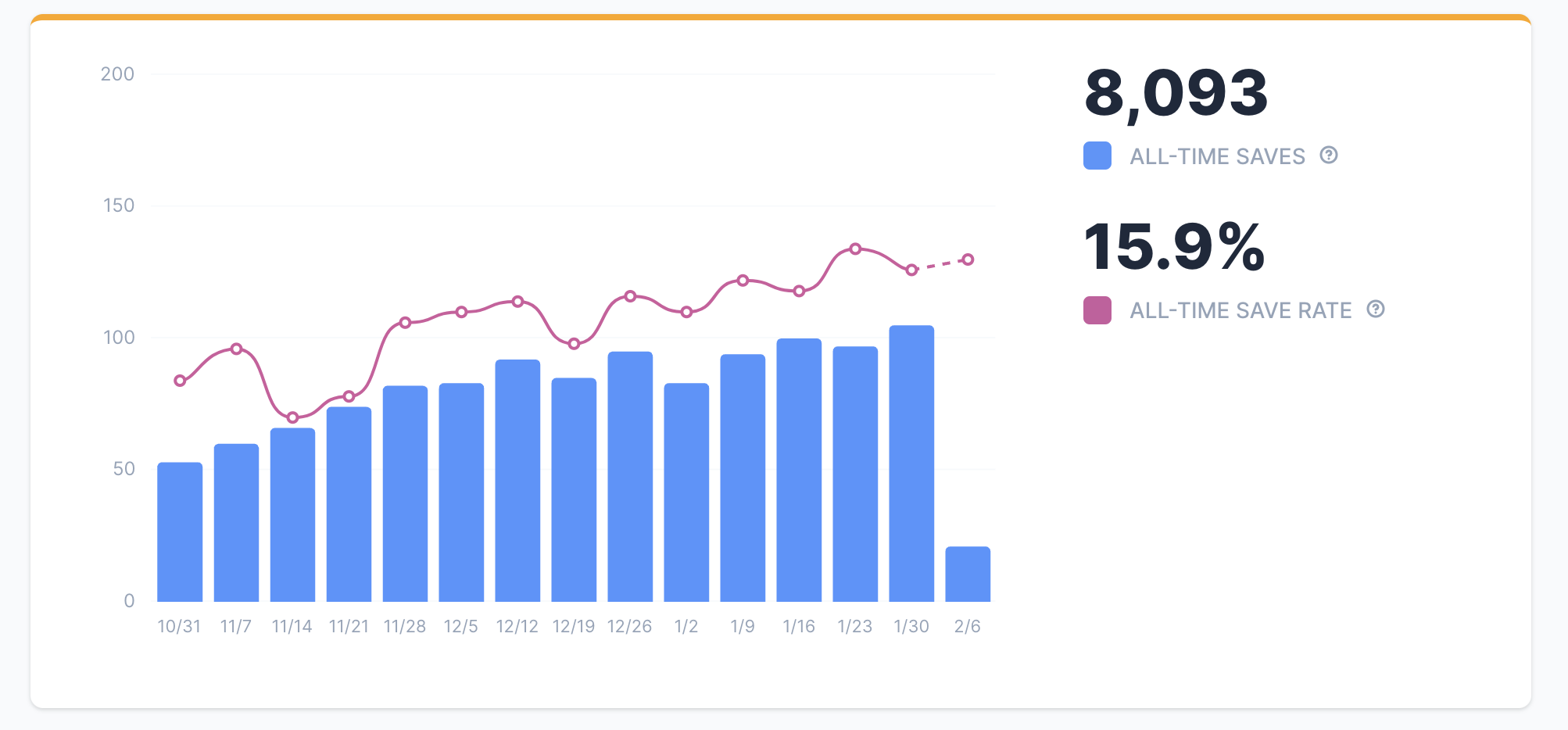
Watch save rate next to cancel volume, the number of definitive sessions. A flat save rate with rising cancel volume means more customers are trying to leave while the flow holds its share. A falling save rate on flat volume means the flow is saving fewer of the same attempts.
How Churn Buster calculates cancel flow save rate
Save rate = Saved / (Saved + Cancelled), counted on definitive sessions. Every definitive session is in the denominator.
A customer can enter the flow more than once, so save rate doesn’t count sessions one by one. A definitive session is the single result that combines every session one subscription has within a 24 hour window. The window starts when a cancel session begins.
Each definitive session gets one result. Cancel beats offer, and offer beats abandon.
- Cancelled. The customer completed the cancellation through the flow in any session in the 24 hour window. Counts as a loss.
- Accepted offer. The customer accepted a save offer and didn’t cancel through the flow in the 24 hour window. Counts as Saved.
- Abandoned. The customer left the flow, or the session expired, without accepting a save offer, and didn’t cancel through the flow in the 24 hour window. It counts as Saved, in the numerator and the denominator.
A save counts as soon as it happens. A later session in the same 24 hour window can replace a result already counted, so a save can drop out of the save total. A customer who skips a box, takes a discount, and cancels a few hours later is one loss, not two saves and a loss. Save Rate works through a full example.
Why cancel flow save rates differ between tools
Some tools credit a save at each step of the flow, so a customer the flow deflects at one step, who cancels seconds later, still shows up as a save. Before you compare two save rates, check how each tool counts a save: per step or per window, and whether abandons count. That difference alone can make a new flow’s save rate come in lower than the figure your previous tool reported.
Save rate also measures only what happens inside the flow. A cancellation your support team makes in your subscription platform never enters a cancel session, so track your platform’s total cancellations as a separate number.
And a save rate isn’t a recovery rate. Churn Buster counts dunning recovery on campaigns that resolve over days or weeks, while cancel flows settle each definitive session within 24 hours. Two Measurement Frames covers why each system gets its own metric.
Cancel flow offer performance and cancel reasons show what to change
Offer reporting shows how many customers saw each offer and how many accepted it. Seen minus accepted doesn’t equal cancelled, because the remainder is a mix of cancellations, exits, and expired sessions. To count cancellations for a specific reason, use the cancel reason chart or the session export.
When you test competing offers, Smart Offers routes traffic toward the highest performing variant as results come in. It needs volume to learn from, so a flow with little traffic takes longer to settle on a winner.
Cancel reasons tell you which problem an offer should solve. Cancel Reasons covers structuring the survey so those answers are usable, and Targeted Offers covers matching offers to them.
Sentiment AI finds patterns in cancel flow feedback
Sentiment AI is the reporting layer inside Cancel Flows, not a separate product or integration. It scores the sentiment of the feedback customers give with their cancel reasons, and it surfaces patterns across the whole body of feedback, so you can spot recurring complaints and see which customer segments need attention without reading every response.
Getting cancel flow data out with exports and webhooks
The most complete record is the session export, available from the top of the Sessions page. It lays out every session in a table, including the cancel reason and feedback each customer gave.
To look at one customer, open the dropdown next to them on the Sessions page to see which action they took on which subscription. The eye icon shows the session detail, including the offers they saw and their feedback.
For live data, Churn Buster sends two cancel flow webhooks, Cancel session won and Cancel session lost, which you can route into tools like your email or SMS platform. If you rebuild save rate in a data warehouse, apply the same definitive session rules so both numbers measure the same thing.
Where to go next
Each part of the flow you measure here has its own page.
- Cancel Flows Overview, how exit surveys, deflections, and offers fit together.
- Cancel Reasons, designing survey questions that produce a usable signal.
- Targeted Offers, matching offers to the reasons customers give.
- Deflections, the value reminders and easy ways to put off cancelling.
- Segmentation, running different flows for different customer types.